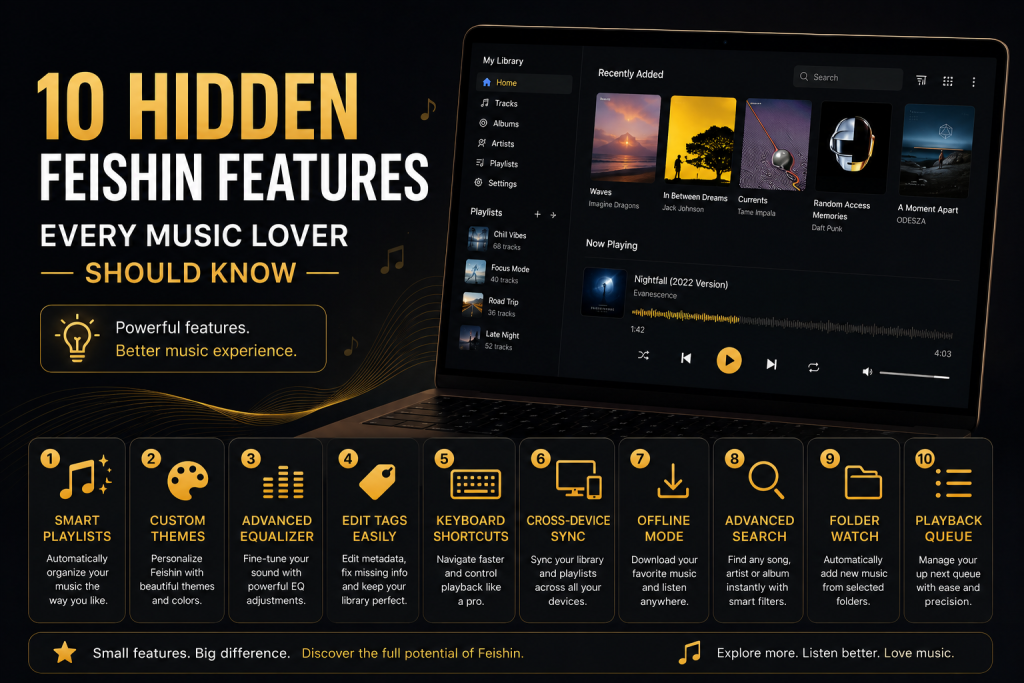
Feishin has quickly become one of the most popular desktop music players for users who host their own music libraries with Jellyfin, Navidrome, or other Subsonic-compatible servers. While many people use Feishin simply to play songs, the application offers numerous powerful features that often go unnoticed. Whether you’re a casual listener or someone with thousands of albums in your collection, learning these hidden features can dramatically improve your music experience.
In this guide, we’ll explore ten hidden Feishin features every music lover should know and explain how each one can help you get more from your self-hosted music library.
Powerful Universal Search
One of the most underrated features in Feishin is its fast and intelligent search functionality.
Instead of manually browsing through artists or albums, you can search almost instantly for songs, albums, artists, playlists, or genres from a single search bar. Even very large music libraries with tens of thousands of tracks remain responsive thanks to Feishin’s optimized interface.
This feature becomes especially useful if your collection spans multiple genres or decades. Rather than navigating through folders, you can simply type a few letters and immediately jump to the music you’re looking for.
If you regularly listen to large collections, mastering the search function alone can save countless hours.
Beautiful Album-Centered Browsing
Unlike many media players that focus primarily on file lists, Feishin emphasizes albums and artwork.
This design makes your music library feel much more like browsing a professional streaming service. High-quality cover art, artist pages, and album layouts allow you to rediscover music visually rather than relying only on filenames.
For collectors who carefully organize metadata and album artwork, this creates a far more enjoyable listening experience than traditional desktop music players.
Intelligent Queue Management
Many users simply double-click a song and start listening, but Feishin’s queue management system offers much more flexibility.
You can easily add songs to play next, move tracks within the queue, remove unwanted songs, or build an entirely new listening session without interrupting current playback.
This makes Feishin particularly useful during long work sessions, parties, or study periods where you want music to continue playing without constant interaction.
Instead of creating permanent playlists for every situation, you can build temporary queues that perfectly match your mood.
Also Read: Feishin vs Finamp: Which Jellyfin Music Client Should You Choose?
Seamless Integration with Multiple Servers
One feature that many users overlook is Feishin’s ability to work with multiple supported music servers.
If you maintain separate libraries—for example, one personal collection on Jellyfin and another on Navidrome—you can configure multiple connections inside Feishin and switch between them whenever needed.
This flexibility makes Feishin an excellent choice for advanced users who manage different music collections or operate multiple home servers.
Rather than installing several applications, one interface provides access to everything.
Keyboard Shortcuts That Save Time
Power users often rely on keyboard shortcuts to navigate software efficiently, and Feishin includes several shortcuts that speed up everyday listening.
Instead of reaching for the mouse every time you want to pause playback or skip tracks, keyboard controls allow you to perform common actions almost instantly.
For users who spend hours listening while working, programming, studying, or writing, these shortcuts significantly improve productivity by reducing unnecessary interruptions.
Learning just a handful of shortcuts quickly becomes second nature.
Smart Playlist Support
Playlists are much more than simple song collections.
Feishin allows users to organize favorite tracks into custom playlists that sync directly with compatible servers. Whether you’re creating workout mixes, relaxing evening playlists, road trip collections, or genre-specific libraries, everything remains neatly organized.
Because playlists are stored through your music server, they remain available across different devices instead of being locked to one computer.
This creates a consistent listening experience wherever you access your music.
High-Quality Album Artwork Display
Many desktop players treat album artwork as an afterthought.
Feishin does the opposite.
The application displays high-resolution cover images throughout the interface, creating an attractive music browsing experience that closely resembles commercial streaming platforms.
When your music files contain properly embedded artwork or correctly named cover images, your library immediately feels more polished and professionally organized.
For collectors who value visual presentation as much as audio quality, this feature makes a noticeable difference.
Fast Performance with Large Music Libraries
As music collections continue growing, many traditional desktop applications begin slowing down.
Feishin is designed to remain responsive even when managing libraries containing thousands of artists and albums.
Browsing, searching, loading artwork, and switching between views all remain fast because Feishin retrieves information efficiently from supported media servers.
For users migrating from older desktop players that struggle with massive collections, the difference in speed is immediately noticeable.
Clean and Modern User Interface
One reason many music enthusiasts switch to Feishin is its carefully designed interface.
Rather than overwhelming users with unnecessary buttons and complicated menus, Feishin focuses on simplicity while still offering advanced functionality beneath the surface.
Its modern layout allows listeners to spend less time managing software and more time enjoying music.
Dark themes, clean typography, responsive layouts, and intuitive navigation combine to create an interface that feels contemporary without sacrificing functionality.
This balance between appearance and usability makes Feishin enjoyable for both beginners and experienced users.
Also Read: Common Feishin Mistakes and How to Avoid Them
Privacy Without Subscription Fees
Perhaps the biggest hidden advantage of Feishin isn’t a button or menu at all.
Unlike commercial streaming services that require monthly subscriptions and collect usage data, Feishin works with your own self-hosted media server.
Your listening history, playlists, music collection, and account information remain under your control rather than being stored on third-party platforms.
For privacy-conscious users, this level of ownership is one of Feishin’s strongest selling points.
You decide where your music is stored, how it’s accessed, and who can listen to it.
Tips for Getting the Best Experience
To unlock the full potential of Feishin, spend some time organizing your music library before connecting it to your media server. Proper metadata, artist names, album titles, genres, release years, and high-quality album artwork greatly improve browsing and search results.
It’s also worth keeping both Feishin and your media server updated. New releases often introduce performance improvements, bug fixes, and additional features that enhance the overall listening experience.
Finally, don’t hesitate to explore the application’s settings. Many useful options related to playback behavior, appearance, and interface customization are available and can help tailor Feishin to your personal preferences.
Why These Features Matter
Many users install Feishin simply because they want a desktop client for Jellyfin or Navidrome. However, after spending more time with the application, they discover that it offers far more than basic music playback.
Its combination of elegant design, fast performance, intelligent library management, and seamless server integration creates an experience that rivals many commercial music applications while remaining completely self-hosted.
These hidden features help transform Feishin from a simple player into a complete music management solution capable of handling libraries of almost any size.
Conclusion
Feishin offers much more than simple music playback. Its fast search capabilities, beautiful album-focused interface, intelligent queue management, support for multiple servers, high-quality artwork, and privacy-first approach make it one of the best desktop music players for self-hosted libraries. While many users only scratch the surface of what Feishin can do, exploring these hidden features can significantly improve the way you organize, browse, and enjoy your music collection.
FAQs
Does Feishin support Jellyfin?
Yes. Feishin has built-in support for Jellyfin and connects directly to your existing music library.
Can Feishin work with Navidrome?
Absolutely. Navidrome is fully supported, making Feishin a popular desktop client for self-hosted music enthusiasts.
Is Feishin free?
Yes. Feishin is open source and available free of charge.
Can I manage large music collections?
Yes. Feishin is optimized for libraries containing thousands of albums and tracks while maintaining fast search and browsing performance.
Does Feishin support playlists?
Yes. You can create, organize, and manage playlists through compatible music servers.


One Response