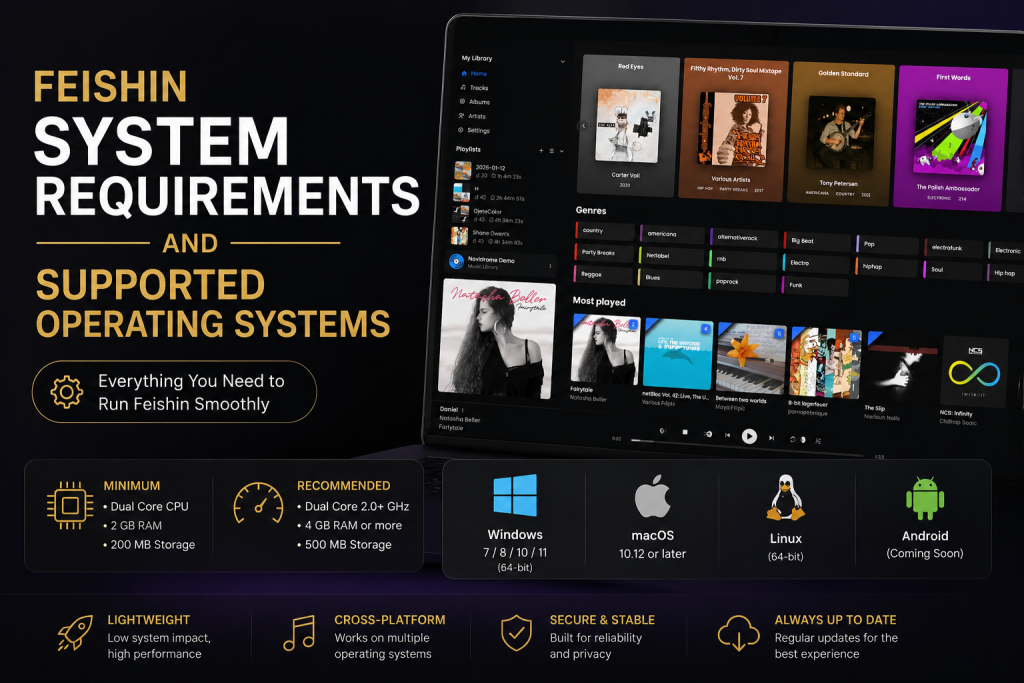
Feishin has become one of the most popular desktop music clients for Jellyfin users thanks to its modern interface, smooth performance, and cross-platform support. Unlike browser-based music players, Feishin is built specifically for desktop operating systems, giving users a faster and more responsive way to access their self-hosted music libraries.
Before installing the application, it’s important to understand the Feishin system requirements and which operating systems are officially supported. While Feishin isn’t a hardware-intensive application, using a compatible operating system and adequate hardware ensures stable playback, quick library loading, and a better overall experience.
In this guide, we’ll cover the supported operating systems, minimum and recommended hardware requirements, platform-specific installation considerations, and tips for getting the best performance from Feishin.
What Are the Feishin System Requirements?
Compared to many modern desktop applications, Feishin is lightweight. Since it primarily streams music from a Jellyfin server instead of processing demanding graphics or video editing tasks, most modern computers can run it comfortably.
Although the project doesn’t publish strict minimum hardware specifications, users generally only need a modern 64-bit desktop operating system, sufficient RAM, and a stable internet connection to enjoy smooth playback. The desktop client is the recommended way to use Feishin because it supports additional playback backends and desktop integrations compared to the web version.
Recommended Hardware
For the best experience, your computer should include:
- 64-bit processor (Intel, AMD, or Apple Silicon)
- 4 GB RAM or more
- At least 500 MB of available storage
- Stable broadband internet connection
- Jellyfin server access
- Audio output device (speakers or headphones)
Users with larger music libraries may benefit from 8 GB of RAM and an SSD, although Feishin itself remains lightweight.
Also Read: How to Manage Playlists Efficiently in Feishin
Supported Operating Systems
One of Feishin’s biggest advantages is its cross-platform compatibility.
The desktop application supports all major desktop operating systems, allowing users to enjoy a consistent experience regardless of their preferred platform.
Windows
Windows is one of the most commonly used platforms for Feishin.
The application works well on modern 64-bit Windows systems and integrates with native desktop features such as media controls and keyboard shortcuts.
Windows Advantages
- Easy installation
- Native desktop interface
- Fast performance
- Multimedia key support
- Smooth library browsing
Feishin works especially well for users who maintain large local or self-hosted music collections and spend most of their day on Windows PCs.
macOS
Feishin also supports macOS, making it an excellent option for MacBook, iMac, and Mac Studio users.
The desktop client supports both Intel-based Macs and Apple Silicon devices. On newer versions of macOS, users may need to remove Apple’s quarantine flag after downloading the application manually, and media key support may require granting accessibility permissions.
macOS Benefits
- Native desktop performance
- Apple Silicon compatibility
- Clean user interface
- Stable music playback
- Excellent multitasking support
Linux
Linux has always been popular among self-hosting enthusiasts, making Linux compatibility especially valuable for Jellyfin users.
Feishin supports Linux desktop environments, allowing users to install the application on many popular distributions.
Common choices include:
- Ubuntu
- Fedora
- Debian
- Linux Mint
- Arch Linux (community packages)
Support may vary slightly depending on packaging methods, but Linux users generally have multiple installation options.
Linux Advantages
- Excellent performance
- Lightweight resource usage
- Open-source ecosystem
- Ideal for self-hosted environments
Is Feishin Available on Mobile Devices?
One question many new users ask is whether Feishin works on Android or iPhone.
The answer depends on how you plan to use it.
Feishin is primarily developed as a desktop music client. Although a web version exists for browser access, there is no dedicated Android or iOS desktop-style application comparable to the desktop client. The hosted web client is available in a browser, but desktop builds remain the recommended experience because they include additional playback capabilities.
If your primary listening device is a smartphone, you may prefer a mobile-focused Jellyfin client such as Finamp.
Browser Support
If you don’t want to install the desktop application immediately, Feishin can also be accessed through a supported web client.
Modern browsers such as:
- Google Chrome
- Microsoft Edge
- Mozilla Firefox
- Safari
generally provide a smooth experience for basic playback, although browser versions may not include every desktop-specific feature.
For the best experience, however, the desktop application remains the recommended option.
Internet Requirements
Since Feishin connects directly to your Jellyfin server, internet quality has a noticeable impact on playback.
A stable broadband connection helps with:
- Album artwork loading
- Streaming high-quality audio
- Faster searches
- Playlist synchronization
- Library updates
If your Jellyfin server is hosted locally on your home network, playback can remain fast even without internet access, provided both devices are connected to the same network.
Storage Requirements
Feishin itself occupies relatively little disk space.
Typical installation requirements include:
- Application files
- Cache storage
- Album artwork cache
- User preferences
Even users with massive music libraries usually store their actual music on the Jellyfin server rather than inside Feishin itself, meaning the desktop client requires only modest local storage.
Also Read: 10 Hidden Feishin Features Every Music Lover Should Know
Memory Usage
One reason many users choose Feishin over browser playback is efficient memory usage.
Instead of opening multiple browser tabs, Feishin runs as a dedicated desktop application.
Benefits include:
- Lower RAM consumption
- Faster startup
- Better responsiveness
- Stable playback
- Improved multitasking
Actual memory usage depends on library size and operating system, but most modern computers handle Feishin comfortably.
Do You Need a Powerful Computer?
Not at all.
Unlike professional media editing software or modern video games, Feishin performs very little computational work.
Most of the heavy lifting—such as organizing and serving your media—is handled by the Jellyfin server.
This means even entry-level laptops can usually run Feishin smoothly as long as they meet the basic operating system requirements and maintain a stable connection to the server.
Final Thoughts
Feishin is designed to be a lightweight, modern, and cross-platform desktop music client that works well on Windows, macOS, and Linux. Because it relies on Jellyfin for media management, it doesn’t require expensive hardware or a powerful graphics card. Instead, a modern 64-bit operating system, adequate memory, and a reliable connection to your Jellyfin server are enough to deliver an excellent listening experience.
FAQs
Does Feishin work on Windows?
Yes. Feishin supports modern 64-bit Windows systems and is one of the recommended desktop clients for Jellyfin users.
Does Feishin support macOS?
Yes. Feishin supports both Intel-based Macs and Apple Silicon devices, with some additional setup steps for media keys on newer macOS versions.
Can I use Feishin on Linux?
Yes. Feishin supports Linux and is commonly used on distributions such as Ubuntu, Fedora, Debian, and Linux Mint.
Does Feishin require a high-end PC?
No. Most modern computers with a 64-bit operating system, 4 GB of RAM, and a stable connection can run Feishin without difficulty.
Can I use Feishin without Jellyfin?
No. Feishin is designed to connect to a Jellyfin server and relies on it to access and stream your media library.


One Response